Running an OnSSET scenario
After GIS-extraction and calibration of the input file, it is finally time to run a scenario using OnSSET to identify the least-cost technologies to meet access targets. This is done using the Jupyter Notebook called 2. OnSSET_Scenario.ipynb which is found among the main OnSSET codes.
To launch the Jupyter Notebook, open Anaconda Prompt and run:
cd PATH
conda activate onsset_env
jupyter notebook
Replace PATH with the location where you downloaded and extracted the
main OnSSET code.
First, open the 1. OnSSET_Calibration notebook.
This notebook runs the electrification scenarios and determines the least-cost technology for each settlement.
Run all cells from top to bottom.
Start by running the first cells to import the required packages.
Step 1 – GIS Data Selection
Select the following files when prompted.
First: OnSSET_InputFile_Calibrated.csv - The calibrated input csv file created in the previous step
Then: bj-2-pv.csv (the first two letters are the country code, so the exact name depends on your country) - This file contains hourly solar resource values and can be downloaded from Energydata.info for 58 countries around the globe. These files have been created using data from Renewables.ninja.
Then: bj-2-wind.csv (the first two letters are the country code, so the exact name depends on your country) - This file contains hourly wind resource values and can be downloaded from Energydata.info for 58 countries around the globe. These files have been created using data from Renewables.ninja.
Finally: Choose a GIS-dataset of existing and planned (if there are lines that are already commissioned/under construction and should be included in the analysis) MV lines
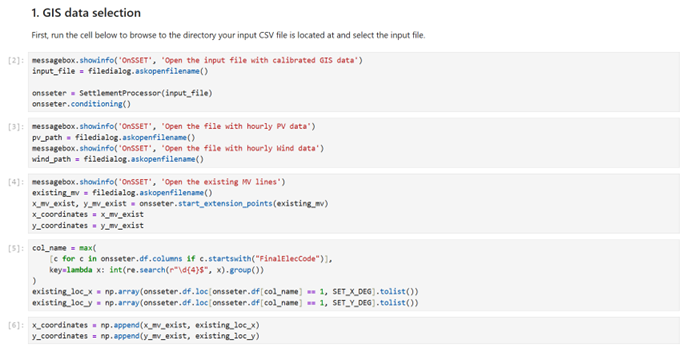
Step 2 – Modelling Period and Electrification Rate
In this section, you define the end year of the analysis and the target national electrification rate by that year.
Step 3 – Country-Specific Data
In this step, you can define country-specific demographic and techno-economic parameters. Check the units closely to ensure you enter data in the correct format.
For an overview of the key techno-economic parameters, please refer to the Excel-file called OnSSET v.2.0 – non-GIS modelling parameters which is included with the OnSSET code.
Step 4 – Run the Scenario
This step runs the electrification model and calculates the least-cost technology for every settlement.
Important
This process may take several minutes to hours depending on:
Country size
Computer performance
Dataset resolution
Step 5 – Results, Summaries, and Visualization
This section displays:
Summary tables
Charts
A technology map showing electrification solutions
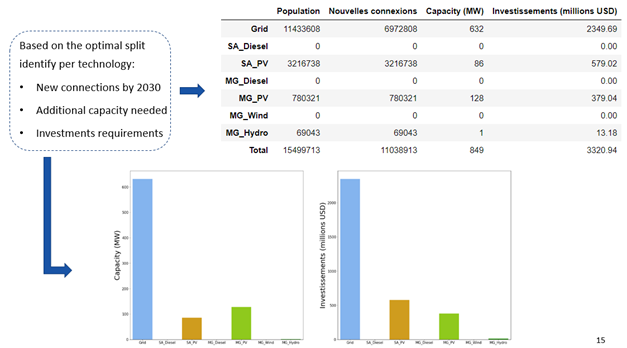
Example visualization of scenario results.
Picture source: OnSSET teaching material https://doi.org/10.5281/zenodo.457403 (CC-BY 4.0)
Step 6 – Export Results
Name your scenario in the first cell.
Run the next cell.
Click OK in the pop-up window.
Select the folder where results should be saved.
Run the final two cells to export:
Settlement-level results
National summary results
The file named Results can be used to generate maps in QGIS, as described in the next section.